CI/CD Pipelines for SaaS Startups
GitHub Actions vs GitLab CI, pipeline stages, Docker multi-stage builds, preview deployments and secrets management. A practical guide for DACH startups.
Why CI/CD is not a luxury
Many SaaS startups deploy manually. Someone runs npm run build on their laptop, copies the files via SCP to the server, and hopes nothing breaks. This works until the third team member joins or the first production bug that cannot be reproduced.
CI/CD (Continuous Integration / Continuous Deployment) automates the entire path from git push to production. Every change is automatically tested, built, and deployed. It sounds like overhead, but from day one it saves time and eliminates an entire category of failure modes.
4x
Faster releases
Teams with CI/CD vs. manual deployment
3x
Lower error rate
Through automated testing before deployment
15 min
Setup time
For a minimal GitHub Actions pipeline
The minimal pipeline
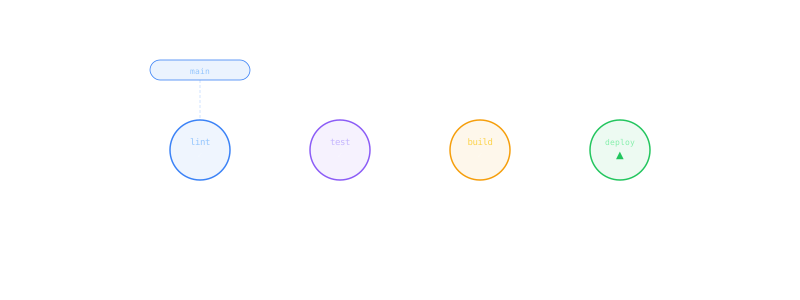
Before we discuss tools, here are the four stages every pipeline needs:
Pipeline stages (push to production)
Lint & Format
Automatically check code quality
ESLint, Prettier, TypeScript compiler. Catches 80% of trivial errors.
Test
Run unit and integration tests
Jest, Vitest, or Playwright. At minimum the critical paths.
Build
Create production build
Docker multi-stage build or npm run build. Version artifacts.
Deploy
Automatically to staging or production
Staging on every push to develop, production on tags/releases.
Each stage aborts if the previous one fails. That is the core of CI/CD: no broken build reaches production.
GitHub Actions vs GitLab CI
The two most relevant options for startups in the DACH region. Both are mature, both have free tiers.
GitHub Actions
Price: 2,000 minutes/month free (public repos unlimited) Runners: GitHub-hosted or self-hosted
GitHub Actions uses YAML files in .github/workflows/. The ecosystem of pre-built actions is massive: thousands of building blocks for Docker, AWS, Terraform, Slack notifications.
name: CI
on: [push, pull_request]
jobs:
  test:
    runs-on: ubuntu-latest
    steps:
      - uses: actions/checkout@v4
      - uses: actions/setup-node@v4
        with: { node-version: 20 }
      - run: npm ci
      - run: npm run lint
      - run: npm test
      - run: npm run build
Strengths:
- Largest ecosystem of actions (Marketplace)
- Seamless GitHub integration (status checks, PR comments)
- Matrix builds (test Node 18, 20, 22 in parallel)
- Self-hosted runners for sensitive workloads
Weaknesses:
- Minute-based pricing can get expensive
- YAML syntax sometimes cumbersome
- Debugging workflows is moderately comfortable
GitLab CI
Price: 400 minutes/month free Runners: GitLab SaaS or self-hosted
GitLab CI uses a single .gitlab-ci.yml file. Docker-native, Auto DevOps for standard projects, integrated container registry.
Strengths:
- Everything in one platform (code, CI, registry, monitoring)
- Docker-native pipelines
- Self-hosted GitLab for maximum control
- Auto DevOps for standard setups
- Better pricing when self-hosted
Weaknesses:
- Smaller ecosystem of pre-built integrations
- GitLab SaaS sometimes slow
- Fewer free minutes than GitHub
- Interface can feel cluttered
Monthly cost (team of 5 developers, ~10,000 CI minutes)
*GitHub Free Tier is often sufficient for small teams. Exceeded minutes cost $0.008/min.
Docker multi-stage builds
One of the most important building blocks of a good pipeline. Multi-stage builds keep your production images small and secure.
# Stage 1: Install dependencies
FROM node:20-alpine AS deps
WORKDIR /app
COPY package*.json ./
RUN npm ci --production

# Stage 2: Build
FROM node:20-alpine AS builder
WORKDIR /app
COPY . .
RUN npm ci && npm run build

# Stage 3: Production image
FROM node:20-alpine AS runner
WORKDIR /app
COPY --from=deps /app/node_modules ./node_modules
COPY --from=builder /app/dist ./dist
USER node
CMD ["node", "dist/main.js"]
Why multi-stage?
- Dev dependencies not in production image (smaller image, less attack surface)
- Leverage build cache (npm ci only on package.json changes)
- Non-root user for security
- Reproducible builds (same output on every machine)
Preview deployments
One of the biggest productivity gains: every pull request automatically gets its own URL with the current version. Reviewers, designers, and product managers can test changes before they are merged.
Vercel and Netlify offer this out-of-the-box for frontend projects. For backend services, you need to build it yourself.
Minimal approach with Docker:
- PR is created
- CI builds a Docker image with the PR branch
- Image is deployed on the staging server under a subdomain:
pr-42.staging.yourdomain.com - Link is posted as a PR comment
- On merge, the preview environment is automatically deleted
This workflow requires initial setup but saves enormous amounts of communication. No more "can you check on your branch?"
Secrets management
Passwords, API keys, and tokens do not belong in code. This sounds obvious, but happens regularly.
Rules:
.envfiles belong in.gitignore, no exceptions- CI/CD secrets through the platform's own management (GitHub Secrets, GitLab CI Variables)
- Production secrets through a secrets manager (AWS Secrets Manager, HashiCorp Vault, Doppler)
- Rotate secrets: API keys should be renewed regularly
GitHub Actions Secrets:
env:
  DATABASE_URL: ${{ secrets.DATABASE_URL }}
  API_KEY: ${{ secrets.API_KEY }}
Secrets are masked in logs and cannot be read in plaintext. Still: minimize the number of secrets and use service accounts instead of personal API keys.
The starter pipeline
For a typical NestJS/Next.js SaaS project, we recommend this pipeline as a starting point:
On every push to a feature branch:
- Lint + format check
- Unit tests
- Build (Docker image)
- Preview deployment (optional)
On merge to develop/staging:
- All of the above
- Integration tests against staging database
- Deploy to staging environment
- Slack notification
On release tag:
- All of the above
- Tag Docker image and push to registry
- Deploy to production
- Health check after deployment
- Rollback if health check fails
Setting up this entire workflow once costs two to three days of development time. After that, it runs automatically. Teams that delegate infrastructure tasks to a subscription development partner can build this in parallel with feature development without blocking the sprint.
Common mistakes
- No pipeline at the start: "We'll do CI/CD later" becomes "We've been deploying manually for 2 years"
- Overly complex pipeline: Start minimal. Lint, test, build, deploy. Everything else comes later
- No staging environment: Deploying directly to production without staging is Russian roulette
- Secrets in code: Once committed, always in git history. Use
git-secretsas a pre-commit hook - Ignoring flaky tests: Tests that are sometimes green and sometimes red undermine trust in the pipeline
Conclusion
A CI/CD pipeline is the foundation of professional software development. It costs an afternoon for the basic setup and will pay for itself from day one. Start with GitHub Actions (largest ecosystem, easiest entry) and extend as needed.
The best pipeline is the one that exists. Perfection comes iteratively.
Related Topics
We're hiring Senior Engineers
100% Remote, DACH